Start free

Solutions

Track training software for the teams you actually coach

Explore Track Tools Pro pages for high school track, college XC/track, clubs, distance groups, and technical-event staffs.

Track training software for high school track teams

High School Track

For high school programs juggling large rosters, assistant coaches, and limited time after school, Track Tools Pro keeps planning, logging, and oversight in one place instead of across spreadsheets, clipboards, and separate apps.

  • Head coaches running boys and girls programs at the same time
  • Programs with distance, sprint, hurdle, throw, and jump groups sharing one roster
Read this track training software page

Track training software for college XC and track staffs

College XC / Track

College staffs usually do not need another single-sport endurance tool. They need one place where XC, indoor, and outdoor planning, group assignment, athlete dossiers, and staff review can stay aligned.

  • College head coaches overseeing XC, indoor, and outdoor workflows
  • Distance, sprint, hurdle, jump, throw, and multis coaches sharing one roster
Read this track training software page

Running club software for coaches and training groups

Running Clubs

Track Tools Pro gives running clubs one place to plan sessions for every ability group, let athletes log runs from their phones, and see who actually trained between sessions, without stitching together spreadsheets, group chats, and a separate logging app.

  • Running clubs coaching adult and youth athletes in one program
  • Clubs with beginner, intermediate, and race-squad groups on the same night
Read this track training software page

Track software for distance-only groups

Distance Groups

Distance-only groups often start with an endurance log. The question is whether they also want roster import, staff oversight, mobile access, athlete dossiers, and room to grow into a broader team workflow without switching tools later.

  • Distance-only groups, XC programs, and road or trail squads
  • Coaches who want mobile athlete access and staff oversight together
Read this track training software page

Track software for throws, jumps, and sprint groups

Throws, Jumps & Sprints

Technical-event coaches need more than an endurance calendar. They need one place to plan sessions, log reps quickly, review readiness, and attach technique feedback to the same athlete workflow.

  • Sprint, hurdle, jump, and throw coaches who need technique review inside the same workflow
  • Head coaches trying to keep technical groups inside the larger team system
Read this track training software page

Workflow

Six steps from roster to review

The whole staff moves from setup to insight without leaving one system.

๐Ÿ“‹
1Step 1

Roster import

Bring in existing roster data from spreadsheets, CSVs, PDFs, pasted text, or a roster URL, then organize athletes by group and staff access.

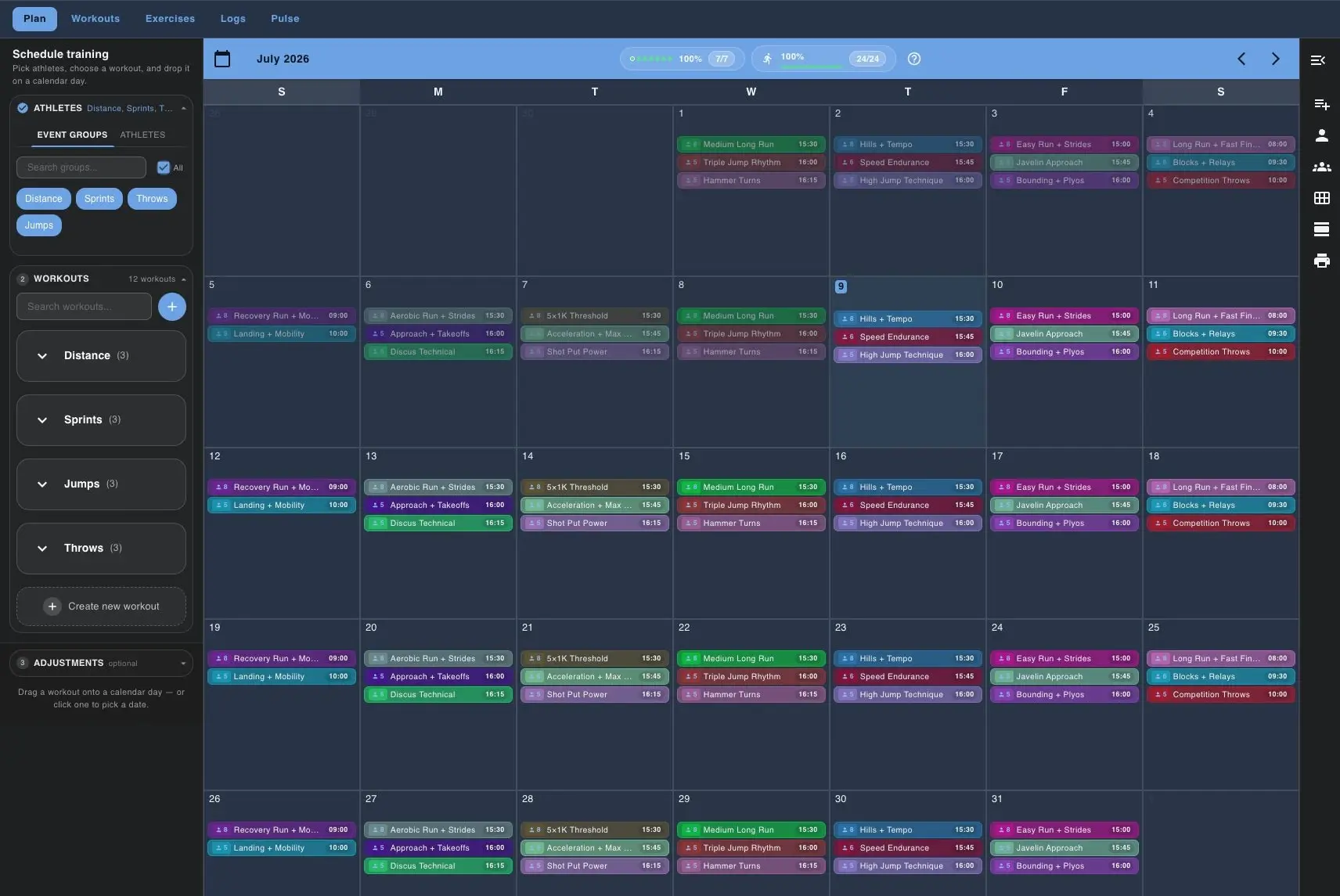
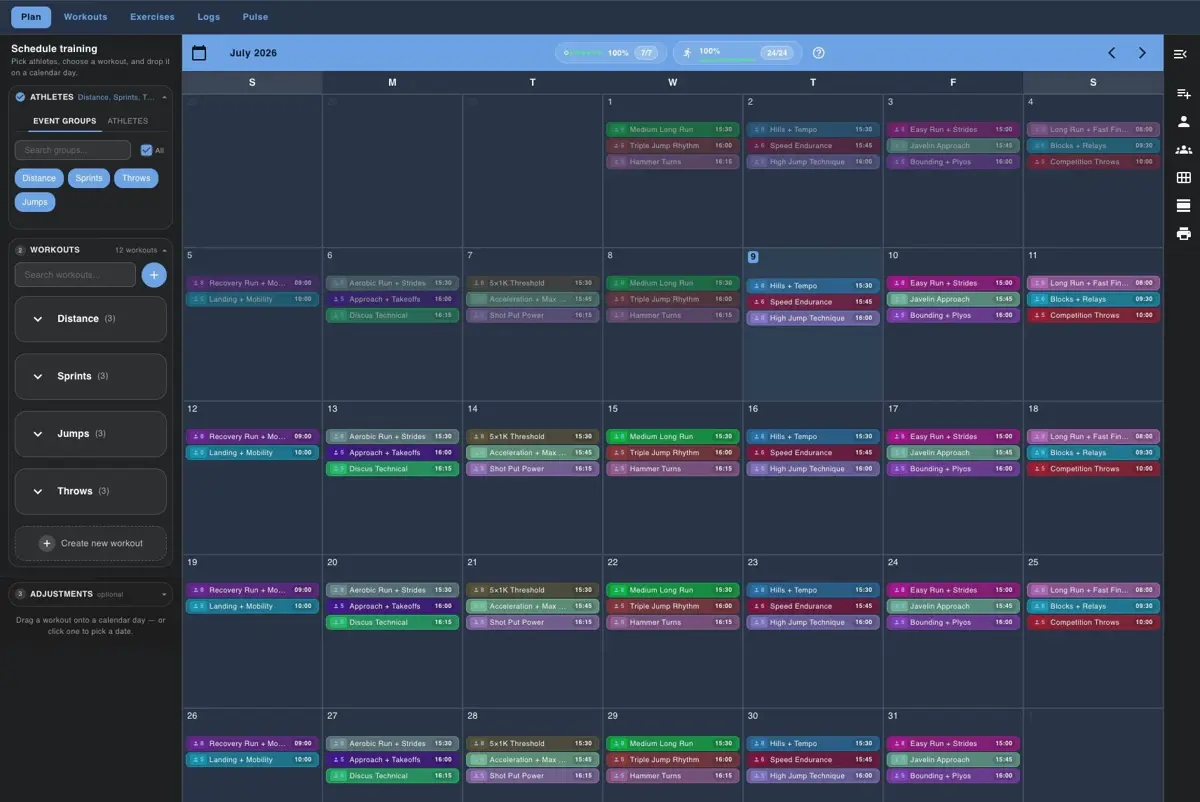
Track Tools Pro training calendar with groups and drag-and-drop planning
2Step 2

Build workout

Create the session in the training calendar and keep the whole week visible while you place workouts on the right dates.

Track Tools Pro training calendar with groups and drag-and-drop planning
3Step 3

Assign by group

Filter and assign by group so distance, sprints, throws, jumps, and road-running work can live in one system without one-size-fits-all programming.

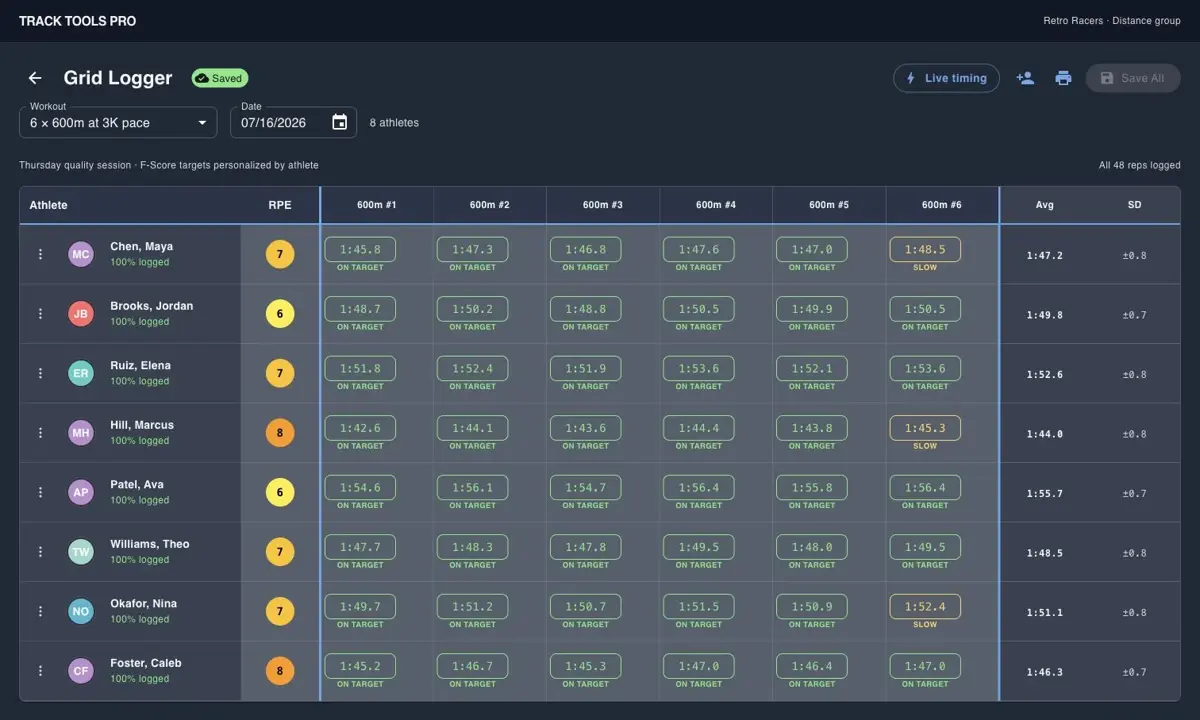
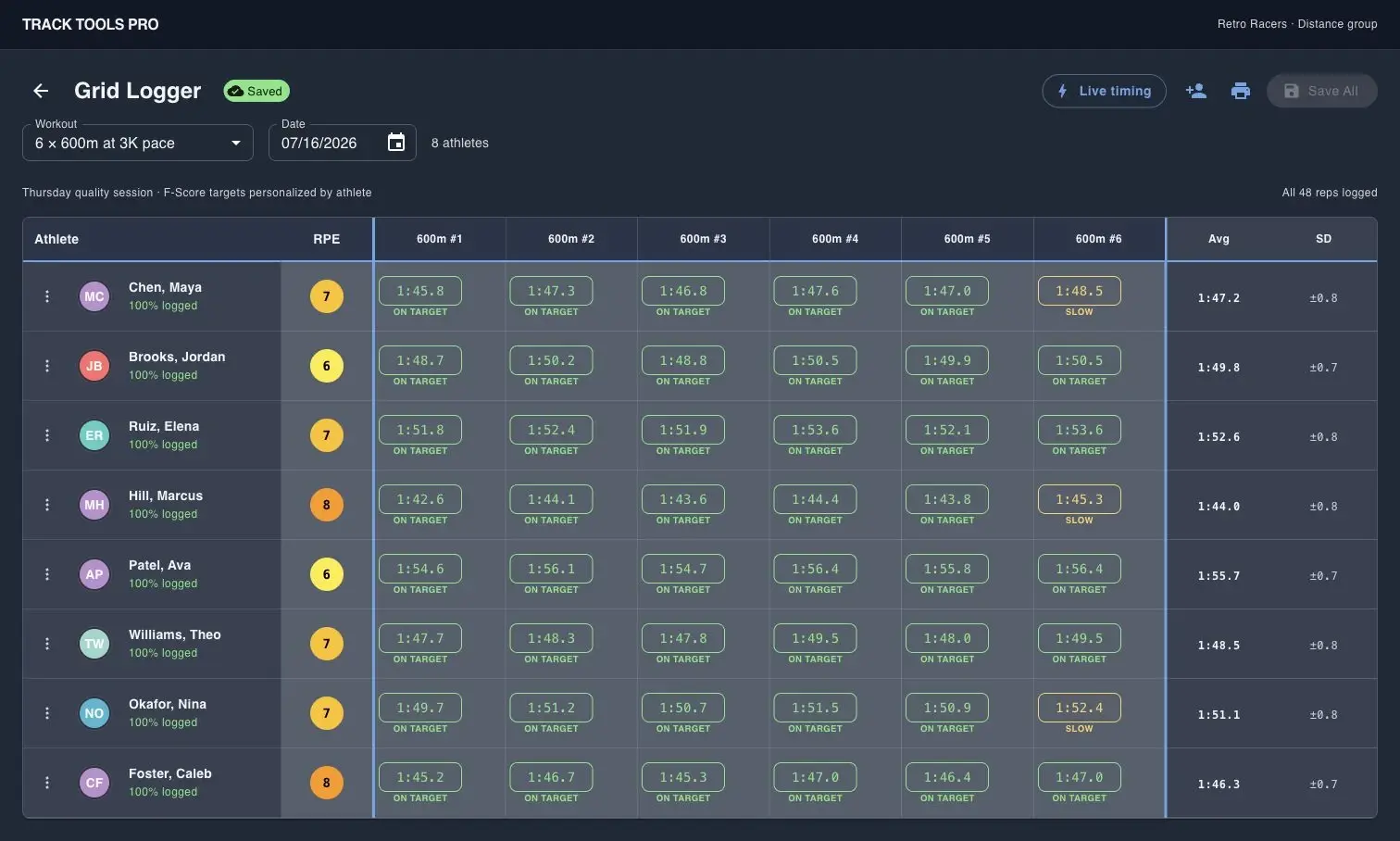
Track Tools Pro Grid Logger screen for logging multiple athletes at once
4Step 4

Athlete logs

Athletes can check the plan on mobile, while coaches can log a whole group quickly from the Grid Logger when that is faster.

Track Tools Pro Pulse dashboard showing roster compliance and load metrics
5Step 5

Coach sees Pulse

Staff can review missed logs, compliance, weekly load, and risk flags from Pulse before the next session begins.

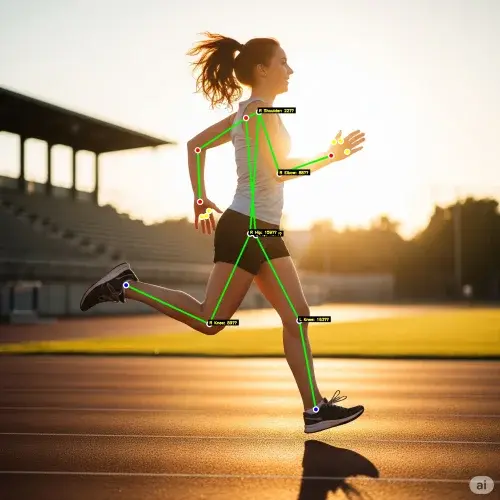
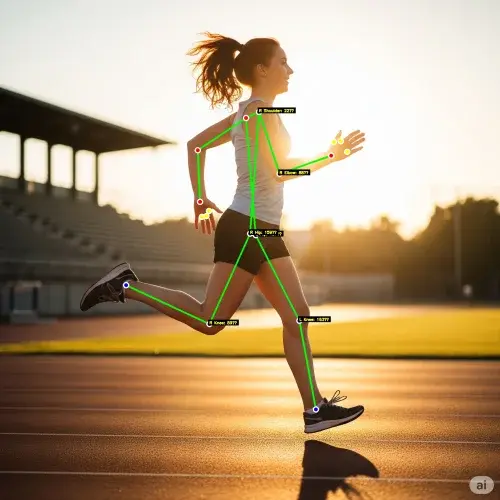
Track Tools Pro Motion Lens screenshot with biomechanical overlay on a runner
6Step 6

Staff reviews Motion Lens

When technique needs another lens, staff can capture video, review landmarks and timing, and keep the feedback attached to the athlete workflow.

Roster โ†’ Plan โ†’ Assign โ†’ Log โ†’ Pulse โ†’ Review

Proof

See how teams run the day-to-day

Browse real Track Tools Pro screens and a coach testimonial that show how staffs plan, log, review, and communicate in one place.

โ€œTrack Tools Pro has significantly reduced the time spent on planning, organizing, and tracking workouts and performances. The platform is efficient, easy to use, and allows me to focus more on athlete development rather than administrative tasks.โ€

Laquone Robinson

Head Cross Country & Track and Field Coach ยท Valley City State University

Track Tools Pro training calendar with groups and drag-and-drop planning

Build the week in one calendar

The planning view lets coaches build the week once, filter by group, and place workouts on the team calendar.

Track Tools Pro Grid Logger screen for logging multiple athletes at once

Log a full group without paper sheets

Grid Logger captures reps, splits, and RPE for multiple athletes in one coach-entered table.

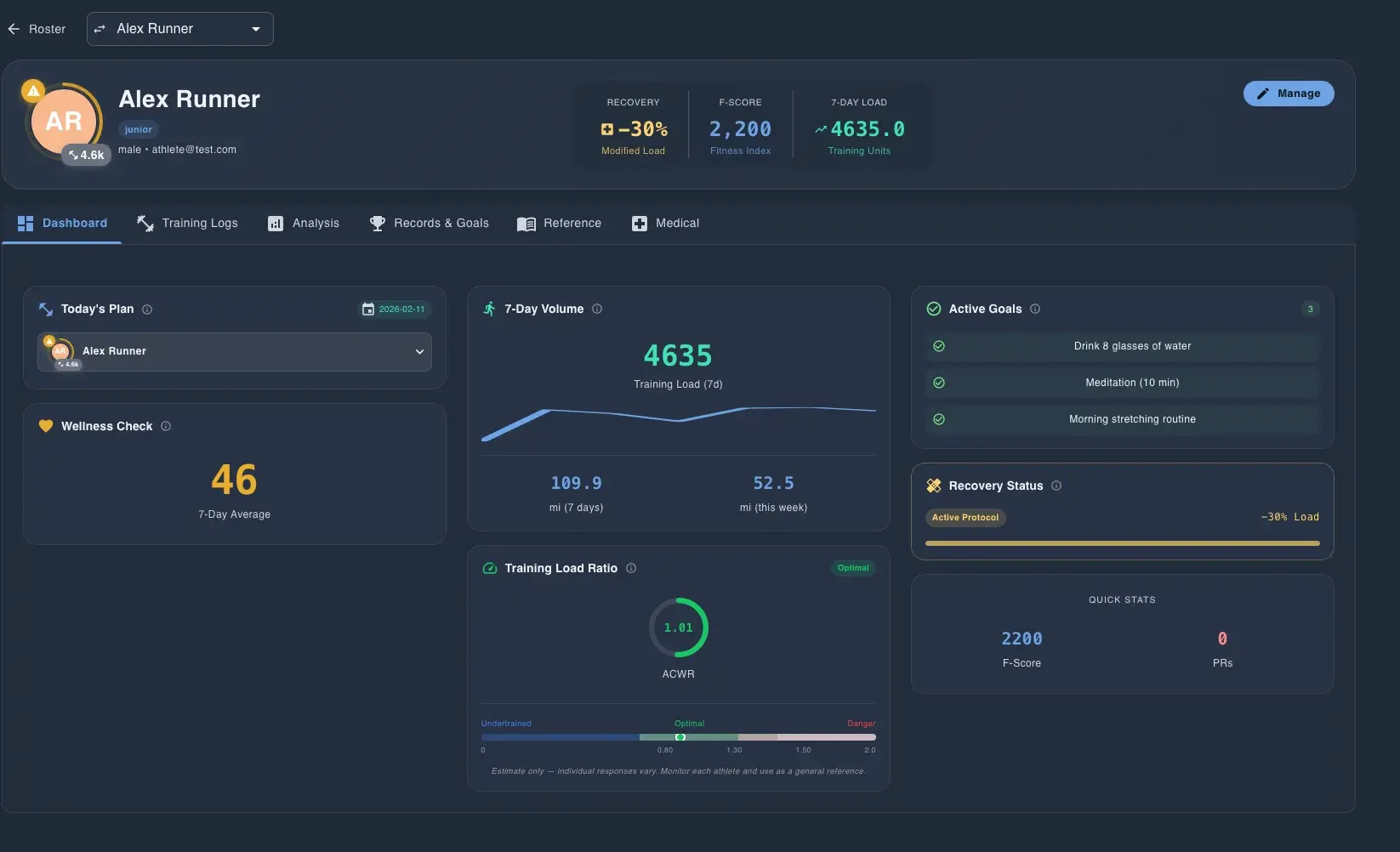
Track Tools Pro athlete dossier showing recovery, load, goals, and wellness

See one athlete in context

The athlete dossier combines training load, readiness, goals, recovery status, and quick stats in one profile.

Track Tools Pro Pulse dashboard showing roster compliance and load metrics

Scan compliance and load before practice

Pulse surfaces compliance, ACWR, monotony, week change, and weekly load so staff can review risk before practice starts.

2-minute walkthrough

Watch the full coach workflow

This walkthrough shows how Track Tools Pro moves from roster setup to planning, group assignment, athlete logs, Pulse review, and Motion Lens in one system.

What the walkthrough covers
  • Get the whole team on one roster
  • Build the week once
  • Log the whole group fast
  • Keep athletes on the same page
  • Pull up one athlete fast
  • See problems before practice
  • Keep film with the athlete
  • Run the whole team in one workflow
Track Tools Pro

The track training software your staff actually uses.

Choose Track Tools Pro when your program needs planning, logging, monitoring, collaboration, and athlete development in one place. If you only need records, reports, and meet admin, a narrower tool may still fit.