Start free

Comparison

Track Tools Pro vs TrackCentral

TrackCentral is a practical, budget-friendly school tool for schedules, lineups, performances, records, and reports. Track Tools Pro is the better fit when the staff needs a broader day-to-day system for planning, logging, monitoring, collaboration, and athlete development.

Public starting price

$48 per team / season

TrackCentral publicly lists pricing starting at $48 for one team for one season, with lower per-team pricing when schools buy multiple teams together.

Best fit for TrackCentral

Budget-conscious school track/XC programs that mainly want schedules, lineups, performances, school records, and printable reports in a straightforward web-based tool.

Official sources reviewed March 13, 2026

Pricing

TrackCentral Pricing (2026)

TrackCentral prices per team per season, with lower per-team rates when schools buy multiple teams together.

Plan
Price
What it covers
1 team
$48/season
One team for one season
2 teams
$35 per team/season
Two teams purchased together
4 teams
$24 per team/season
Four teams purchased together
6 teams
$20 per team/season
Six teams purchased together

Prices as listed on TrackCentral's public pages, reviewed March 13, 2026. Plans and prices can change, so confirm current pricing with TrackCentral before you buy.

How Track Tools Pro pricing compares

Track Tools Pro uses flat annual team pricing: Basic at $100/year (up to 50 athletes, 1 coach), Team at $200/year (up to 75 athletes, 5 coaches, includes the Pulse Dashboard), and Pro at $300/year for larger programs. TrackCentral is the lower-cost option, and it remains the better buy when records, lineups, and reports are the whole job — Track Tools Pro earns its price when the staff also needs daily planning, athlete logs, monitoring, and mobile workflows.

Honest fit

Who should choose what

See where each platform fits best based on staff workflow, daily coaching needs, and team structure.

Choose Track Tools Pro if...

  • You need one platform for daily planning, group assignment, athlete logs, monitoring, reports, and technique review.
  • Your staff includes multiple event coaches who need to collaborate around the same roster and weekly workflow.
  • You want mobile apps, Garmin sync, team files, route builder, and Motion Lens alongside planning and reports.

Choose TrackCentral if...

  • You are extremely budget-sensitive and mainly care about records, reports, lineups, performances, and meet admin.
  • You want a simpler school-team database and are not trying to move the whole staff onto broader daily coaching workflows yet.
  • Most of your buying decision is about performance history and administrative organization, not athlete monitoring or day-to-day coaching operations.

Don't choose Track Tools Pro if...

  • You only want the lowest-cost system for results, school records, and meet administration.
  • Your staff is not ready to adopt daily planning, logging, and monitoring workflows in the same platform.

Where Track Tools Pro wins

Why teams move to one connected workflow

  • Broader day-to-day workflow from roster import to planning, group assignment, athlete logging, Pulse, and Motion Lens.
  • Stronger fit for multi-coach programs that need collaboration, monitoring, mobile access, Garmin sync, and team files in one system.
  • Better value for teams that want athlete development and daily staff operations, not only historical performances and reports.

Where TrackCentral is stronger

What to acknowledge honestly

  • Lower public entry price for school teams that mainly need schedules, lineups, performances, records, and reports.
  • A narrower, simpler product story centered on school-team administration and performance management.
  • Good fit for programs that are not ready to operationalize daily planning, logging, and monitoring in software.

Workflow comparison

Compare the workflow, not just the feature list

Each row focuses on how the staff actually works day to day.

Workflow step
Track Tools Pro
TrackCentral
Daily planning
Build the week in one calendar, assign by group, and keep the full staff on the same daily plan.
Public materials emphasize schedules, lineup assignments, and team management more than daily training-plan construction.
Logging
Athletes can log training on mobile and coaches can batch-enter sessions with Grid Logger.
The public product story is centered on performances, entry marks, results history, and team information rather than daily training logs.
Staff collaboration
Groups, role-based access, shared files, reports, and Pulse give multi-coach staffs one operating system.
Useful for school-team organization, but the scope is narrower and more administrative than a shared daily coaching workflow.
Monitoring
Pulse surfaces compliance, ACWR, load trends, missed logs, and wellness risk before practice.
TrackCentral's public pages focus on performances, school records, reports, and lineups rather than load monitoring or wellness workflows.
Records and reports
Includes reporting inside the broader coaching platform, alongside training data, athlete dossiers, and daily workflows.
This is one of TrackCentral's clearest strengths: school records, top performances, athlete histories, and printable reports are central to the product story.

Pricing facts

Current public pricing snapshot

Reviewed against official public sources on March 13, 2026.

  • Official public sources reviewed March 13, 2026.
  • TrackCentral publicly lists one team at $48, two teams at $35 each, four teams at $24 each, and six teams at $20 each for one season.
  • TrackCentral describes the product as a web-based coaching and athlete-management application for track and field and cross country.
  • TrackCentral's FAQ highlights student records, team schedules, lineup assignments, performances, school records, and reports as core uses.

Best fit by team

Which teams should lean which way

Budget-sensitive high school program focused on records and reports

Competitor

TrackCentral is the better fit when the main job is low-cost performance management and meet administration.

Multi-coach high school track / XC staff

Track Tools Pro

Track Tools Pro becomes more valuable once the staff needs shared planning, groups, athlete logs, monitoring, and mobile workflows.

College XC / track staff

Track Tools Pro

College staffs usually need broader daily coaching, athlete development, and collaboration workflows than a meet/results database alone provides.

FAQ

TrackCentral pricing and alternatives

Quick answers to the questions coaches ask most before choosing.

How much does TrackCentral cost?

TrackCentral publicly lists one team at $48 for one season, two teams at $35 each, four teams at $24 each, and six teams at $20 each — as listed on TrackCentral's public pages, reviewed March 13, 2026.

What are TrackCentral alternatives for school track and XC programs?

Track Tools Pro is the closest all-in-one alternative when a staff wants daily planning, athlete logs, Pulse monitoring, and mobile apps alongside reports, with flat pricing from $100/year. TrackCentral remains a strong low-cost pick for schedules, lineups, performances, and school records.

Is TrackCentral or Track Tools Pro cheaper?

TrackCentral is cheaper: $48 per team per season versus Track Tools Pro plans from $100/year. The right choice depends on scope — TrackCentral covers performance management and meet administration, while Track Tools Pro covers the full daily coaching workflow.

Product proof

See Track Tools Pro in action

Browse real screens for planning, logging, Pulse, and Motion Lens.

Track Tools Pro has significantly reduced the time spent on planning, organizing, and tracking workouts and performances. The platform is efficient, easy to use, and allows me to focus more on athlete development rather than administrative tasks.

Laquone Robinson

Head Cross Country & Track and Field Coach · Valley City State University
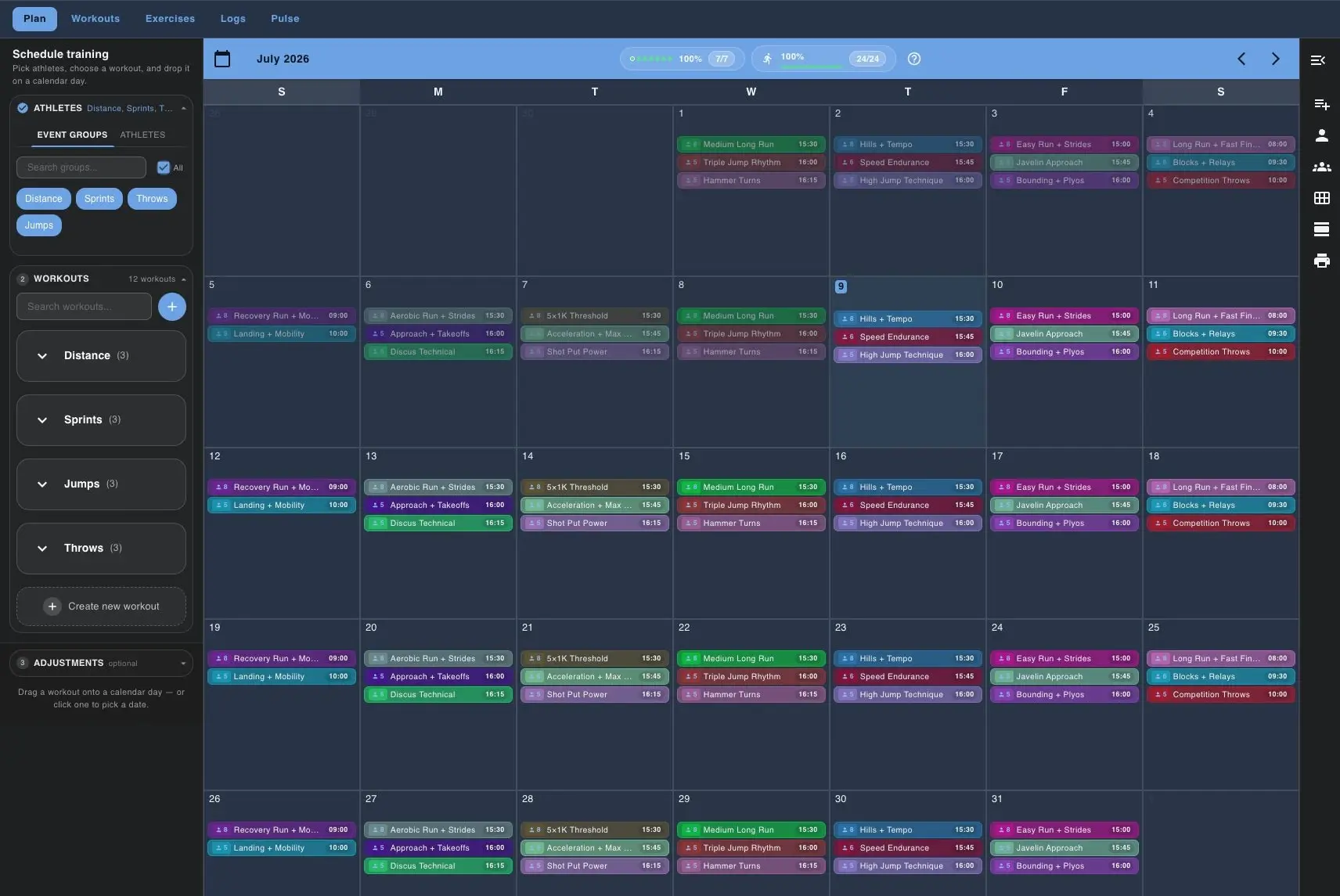
Track Tools Pro training calendar with groups and drag-and-drop planning

Build the week in one calendar

The planning view lets coaches build the week once, filter by group, and place workouts on the team calendar.
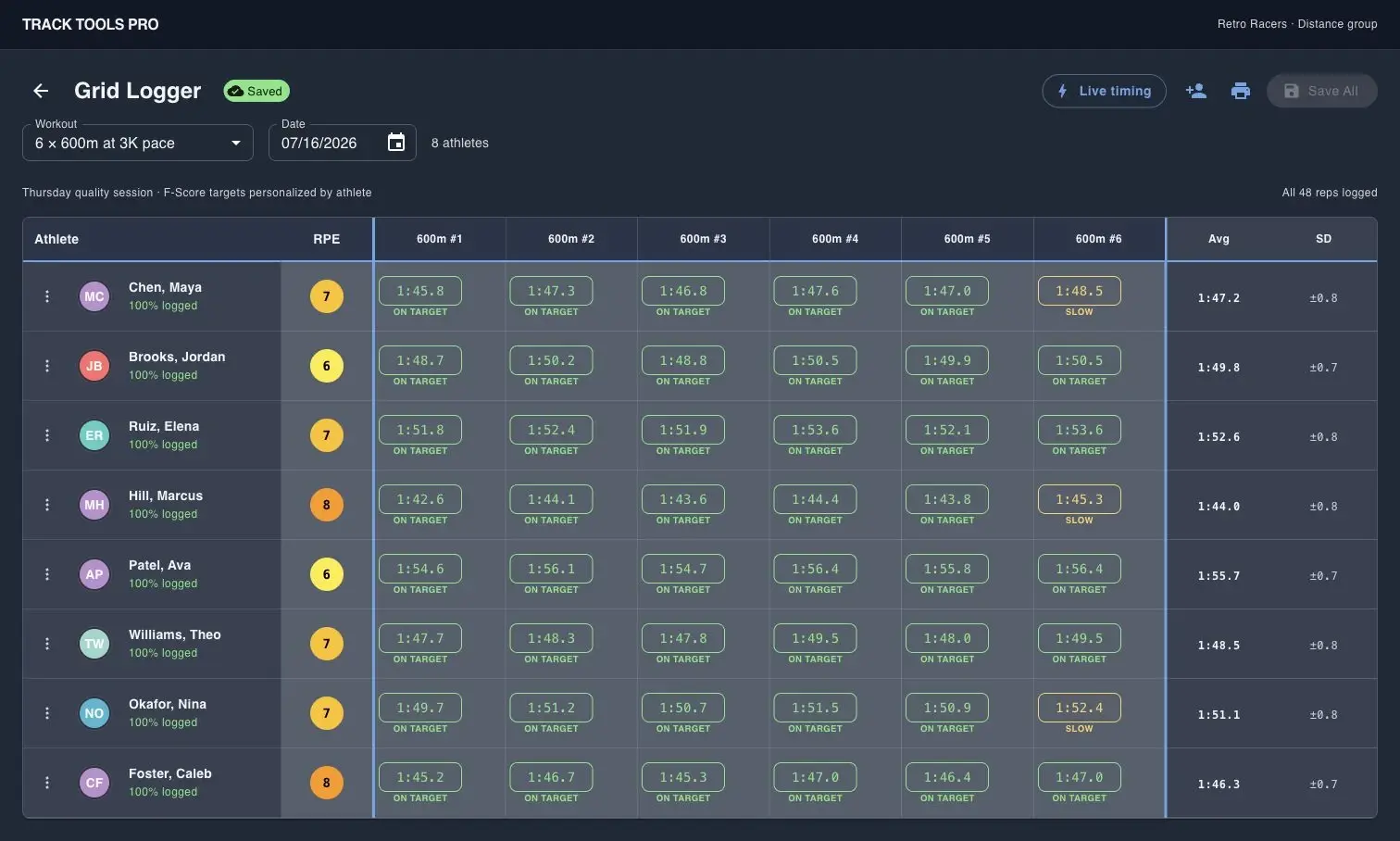
Track Tools Pro Grid Logger screen for logging multiple athletes at once

Log a full group without paper sheets

Grid Logger captures reps, splits, and RPE for multiple athletes in one coach-entered table.
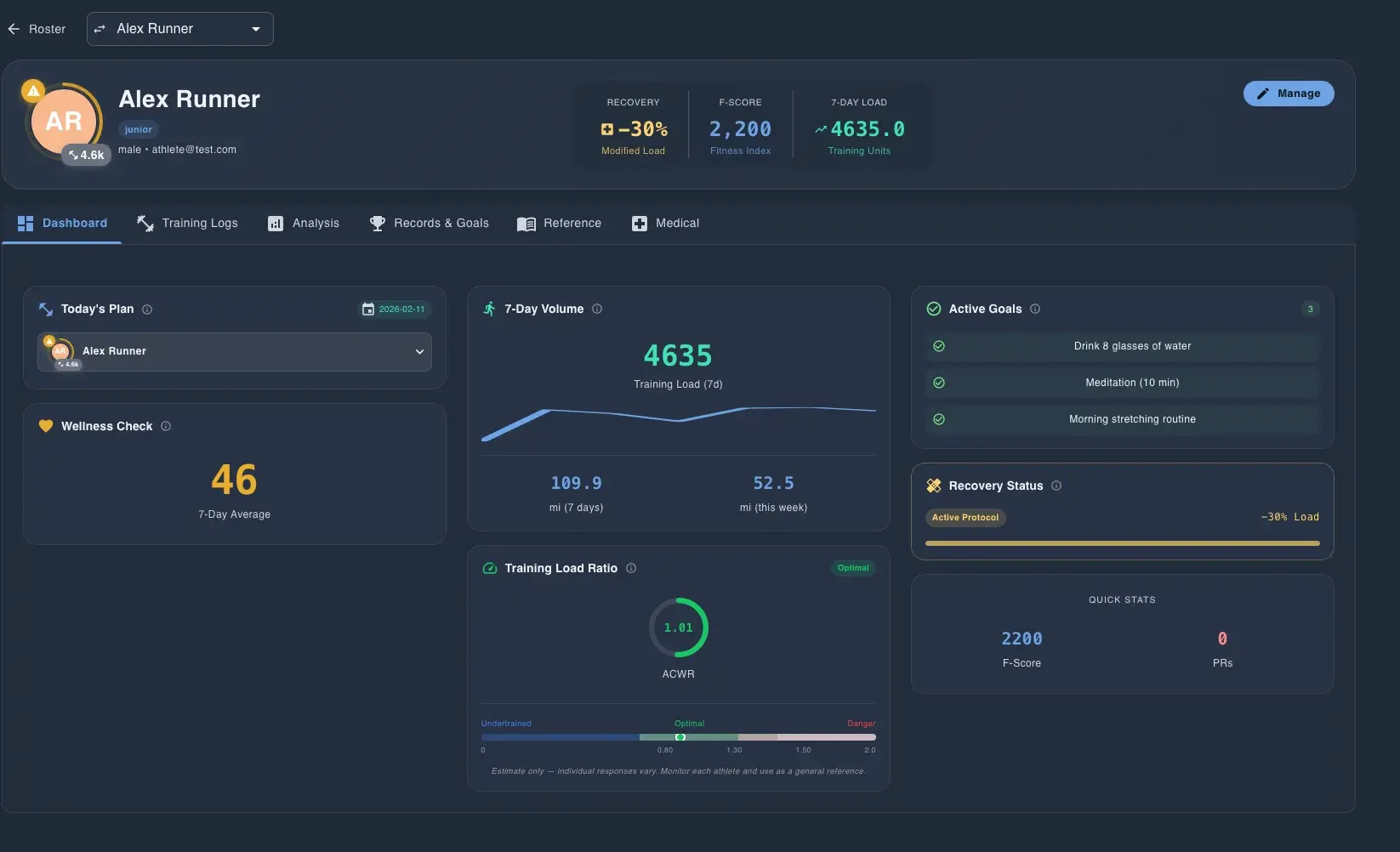
Track Tools Pro Pulse dashboard showing roster compliance and load metrics

Scan compliance and load before practice

Pulse surfaces compliance, ACWR, monotony, week change, and weekly load so staff can review risk before practice starts.

Track Tools Pro Motion Lens screenshot with biomechanical overlay on a runner

Review mechanics with Motion Lens

Motion Lens adds body landmarks and timing feedback so coaches can review technique with athletes and staff.

Demo CTA

Want to see TrackCentral side-by-side against your team workflow?

Ask for a walkthrough focused on your roster size, staff structure, and which comparison assumptions matter to your buying decision.

Common demo requests

  • Roster import and group setup
  • Workout planning and assignment by group
  • Athlete logging on mobile and Grid Logger
  • Pulse review, reports, and scheduled summaries
  • Garmin sync, team files, and Motion Lens